Best Practices & Reference Architecture
for ZFS Data Storage
Storing data is at the core of how organizations operate. As the volume and value of data continue to grow, so does the question of how best to store it.
Open-source storage solutions are gaining popularity as organizations seek power, flexibility, security, and freedom from vendor lock-in.
But with that flexibility comes an important question: how do you implement it properly?
At 45Drives, we’ve spent years designing, configuring, and supporting open-source storage systems for a wide range of use cases. That hands-on experience has shaped the best practices we use to build reliable and resilient storage environments.
We believe this knowledge should be accessible to everyone. Whether you're a large enterprise, a federal agency, a small to mid-sized business, a managed service provider, or even a home user—if your data matters, you deserve the tools to make informed decisions.
That’s why in the spirit of open-source, we’re sharing our reference architecture for open-source storage.
Initial Data Storage Architecture Decision
For choosing an application for storing data, there are several key criteria that should be considered. This includes:
Key Criteria to Consider:
- Access needs and performance
- Scalability requirements
- Safety & Security (Shaped By Perils)
45Drives Specializes In:
Standalone server using ZFS on Linux
High speed, simplicity, reduced cost
Clustering with Ceph
High availability, server redundancy, infinite scalability
Standalone servers offers high speed, simplicity in management, and reduced cost. However, they lack high availability and their scalability is limited by quantity of drive bays. Overall capacity can increase by adding more standalone servers, however that can create a 'storage zoo', creating inefficiencies in file management and sys admin tasks.
Storage clustering works by linking multiple servers into a single unified system. For a marginal increase in cost from a standalone server it provides high availability, server level redundancy, and near infinite scalability. Although it's speed does not rival single servers running ZFS, it is more than adequate for most business applications. To learn more about Ceph, you can register for a free private webinar here.
Focus of This Article
In this article, we are going to focus on defending against perils with Option 1 - standalone servers using ZFS.
Reference Single Server Architecture for Defending Against Perils
Through years of working with enterprise organizations, we have identified eight common threats that put stored data at risk. Understanding these risks, which we call perils, has enabled us to develop effective defenses that form the backbone of our open-source storage reference architecture.
As we walk through each peril and its corresponding defense, we will build this architecture together.
The 8 Perils of Data Loss
Failed Hardware & Storage Drives
Hardware failures including motherboards, RAM, and storage drives due to wear, power surges, or environmental factors
Data Corruption
Data becomes damaged or unreadable due to power losses, failed hardware, or gradual decay (bit rot)
Data Deletion Accidental & Intentional
Data loss from accidental deletion, intentional sabotage, or malicious actions
Viruses & Ransomware
Malicious software that encrypts or destroys data, holding systems hostage
Malicious Unauthorized Access
Security breaches allowing unauthorized users to access, modify, or steal data
Meteors (Natural/Man-made Disasters)
Data loss from natural disasters, fires, floods, or other catastrophic events
Staff Change Over
Knowledge loss and security risks when staff members leave the organization
Panic, Complacency, Assumptions
Human error from rushed decisions, lack of preparation, or incorrect assumptions
Peril 1: Failed Hardware & Storage Drives
Whether caused by component wear, power surges, or environmental factors, hardware failures are inevitable. This includes common components like motherboards, RAM, and storage drives.
Best Practices to Defend Against this Peril:
- Centralize "Active Data" from clients to a storage server accessible over your network
- Choose enterprise grade, non-proprietary hardware from reputable suppliers
- Use redundant components and/or servers
- Use Software Defined Storage to create a RAID
- Enable & Monitor Alerts
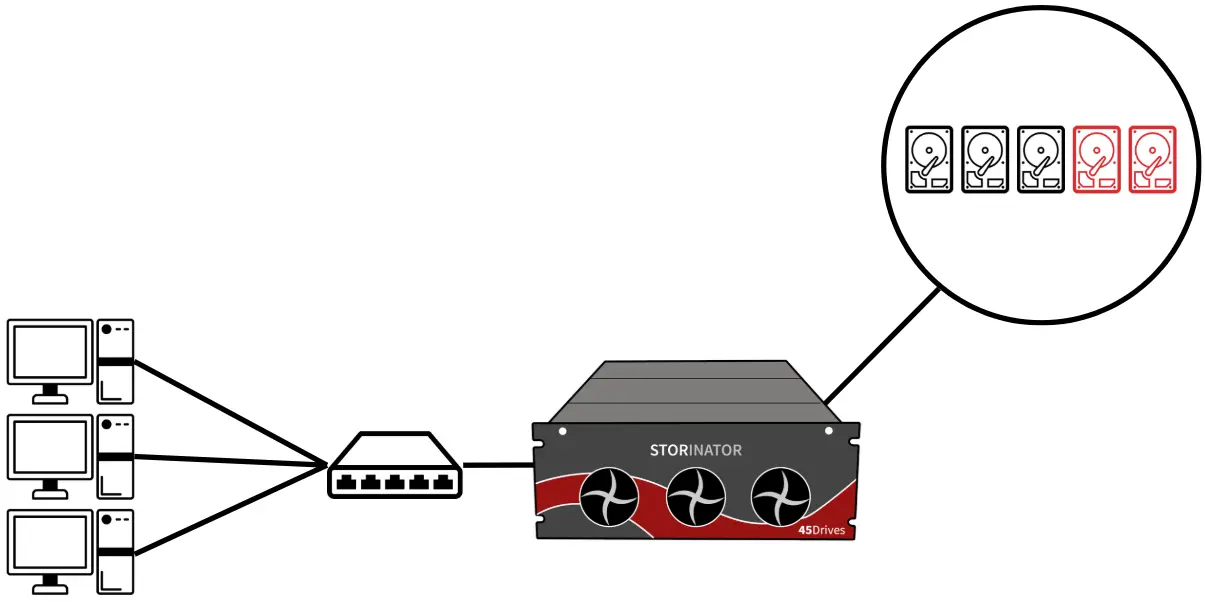
Centralize Active Data from Clients to Storage Server
Active data refers to valuable data that is regularly being accessed, or needs to be accessed quickly. It is not uncommon for employees to save their data directly to their personal computers (e.g. the local "C:" drive). This poses challenges as computers are siloed from the rest of the organization, and typically have only one storage drive.
Data deemed to be valuable should never be held on a single disc, as failures occur. To mitigate this risk, the first step is to move from storing data on individual clients, to a centralized storage server over the local network. Not only will this give added convenience and increased collaboration, but provide access to have data stored on multiple storage drives.
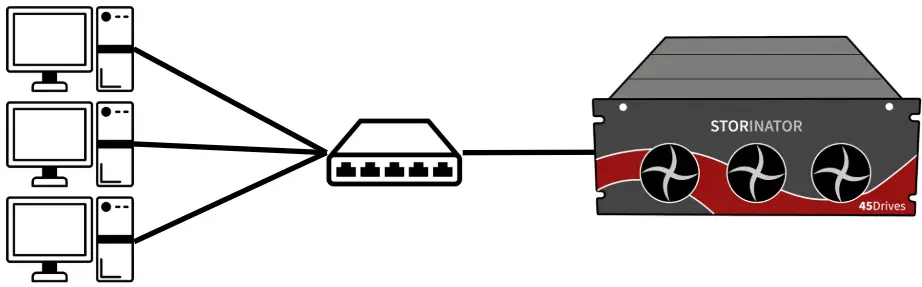
Hardware Considerations
Now that our data is stored in a centralized location, it's important to carefully consider the appropriate hardware for both the storage server and the drives. As with the individual computers mentioned earlier, hardware and storage drive failures are inevitable in storage servers as well. To mitigate the impact of such failures, the best approach is to choose hardware that is enterprise grade, non-proprietary, and sourced from a reputable or authorized supplier.
Enterprise Grade Hardware
While consumer-grade hardware can effectively store data, enterprise-grade components are built for longevity and reliability. They typically offer a much higher mean time to failure (MTTF), meaning they are designed to operate for longer periods before experiencing issues. In short, they last longer under sustained workloads.
Nonproprietary Components
Using proprietary hardware can lead to vendor lock-in, which increases financial risk and limits future flexibility. If a vendor decides to discontinue a specific part, you may be forced to replace an entire system rather than a single component. Opting for non-proprietary, off-the-shelf, and easily interchangeable hardware helps avoid these complications.
Reputable or Authorized Suppliers
The risk of counterfeit hard drives being sold as new has increased across various marketplaces. These counterfeit drives often result in poor performance and early system failures. Purchasing from an authorized supplier mitigates this risk. If you already have drives that were not sourced through authorized channels, we offer an open-source tool that you can run to determine whether your drives are new, lightly used, or heavily used. You can learn more by visiting our drive checker page: Drive Checker.
Redundant Components
Redundant components such as power supplies and network interface cards help minimize downtime by ensuring continued operation in case of failure. This can range from a spare part kept on-site for quick manual replacement to integrated hot-swappable components that automatically take over when one fails.
RAID via Software-Defined Storage
Enterprise-grade storage drives are known for their reliability under heavy workload. However, drive failures are inevitable, and should be expected. Data stored on a single drive is at major risk of being lost when the drive fails. To defend against storage drive failures, a RAID should be implemented.
RAID (Redundant Array of Independent Disks) combines multiple physical drives into a single volume. It copies or spreads data across drives to provide redundancy, allowing the system to keep working even if one or more drives fail. RAID can be achieved via specific hardware, or by using software.
Legacy hardware RAID uses dedicated specific controllers to combine multiple drives into one volume. However, relying on specific controllers creates risks of vendor lock-in and limits upgrade flexibility.
On the other hand, software-defined storage separates RAID creation from hardware. This allows RAID to be built using standard off-the-shelf components and storage drives, regardless of their physical configuration within a storage server. An example of a modern file system that also manages these volumes is ZFS (Zettabyte File System).
RAIDZ1
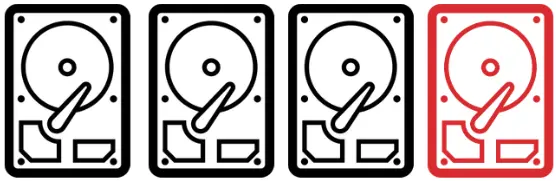
Similar to RAID5 and offers fault tolerance for one drive. This means the system can continue running if a single drive fails. It works best with a small number of drives, typically around four.
Fault Tolerance: 1 drive failure
RAIDZ2 (Recommended)
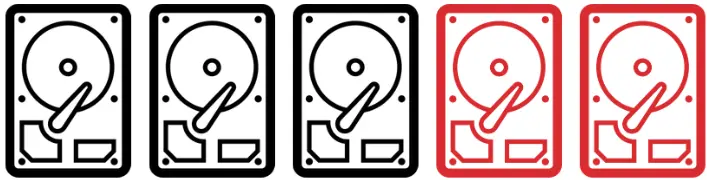
Five HDDs in RAIDZ2, provides two drive fault tolerance
Similar to RAID6 and provides fault tolerance for two drives, allowing the system to withstand failure of up to two drives without data loss. It is recommended over RAIDZ1 because it offers greater protection, especially as the number and size of drives increase, reducing the risk of data loss during rebuilds.
Fault Tolerance: 2 drive failures
Recommendation: Standard for enterprise customers
Important: When choosing a ZFS RAID configuration, consider the number and capacity of the drives. It's best to use drives of the same capacity. Keep in mind that fault tolerance requires storing parity data, which reduces the total usable storage space.
Enable & Monitor Alerts
Knowing when a hardware or hard drive failure occurs allows for swift action to fix. Usually the faster something can be fixed, the less potential impact it can have.
Houston User Interface from 45Drives includes built-in system monitoring and lets you enable alerts when hard drive issues or other hardware anomalies are detected. You can choose to receive these alerts via email, phone, or other preferred channels. To learn more about Houston UI for managing your ZFS storage, click here.
Peril 2: Data or System Corruption
When data becomes damaged or unreadable, it is corrupted. Data corruption can occur gradually or suddenly due to power losses, failed hardware, or gradual decay (bit rot).
Best Practices to Defend Against this Peril:
- Use a modern file system that includes checksumming such as ZFS or CephFS
- Backup your data to a separate storage pool(s)
- Enable & Monitor Alerts
Checksumming
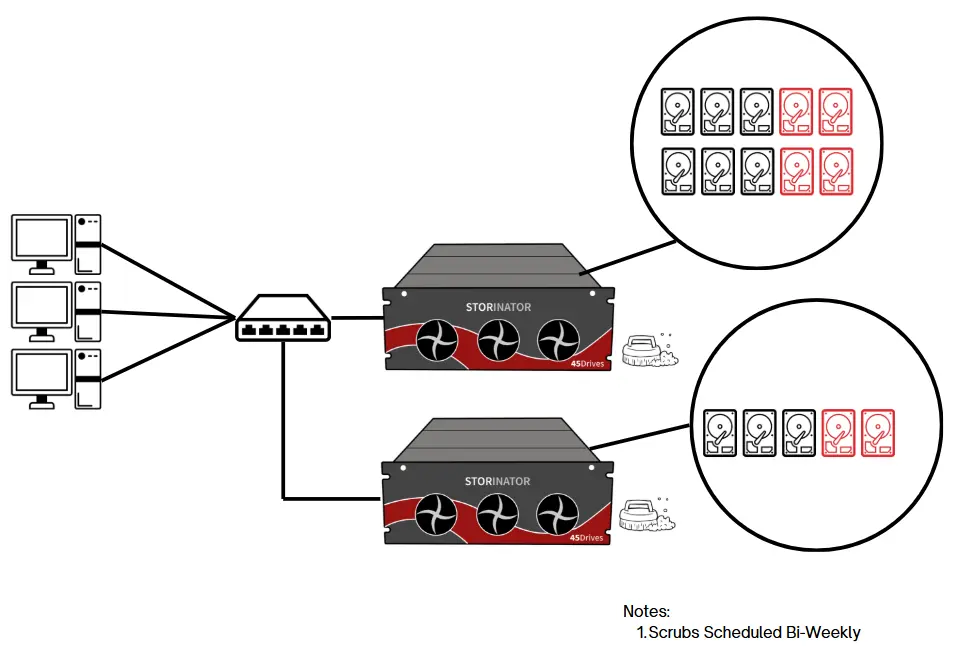
When data is written using a modern file system like ZFS, a small, unique value called a checksum is generated and stored with the data. When the data is read, ZFS recalculates the checksum and compares it to the original. If they match, the data is intact. If not, the data is likely corrupted.
For active data which is read regularly, ZFS will automatically repair the corrupted data using the parity data in the RAID.
For colder data which is not read regularly, data "scrubs" can be scheduled bi-weekly off hours to avoid Bit Rot.
Local Backups
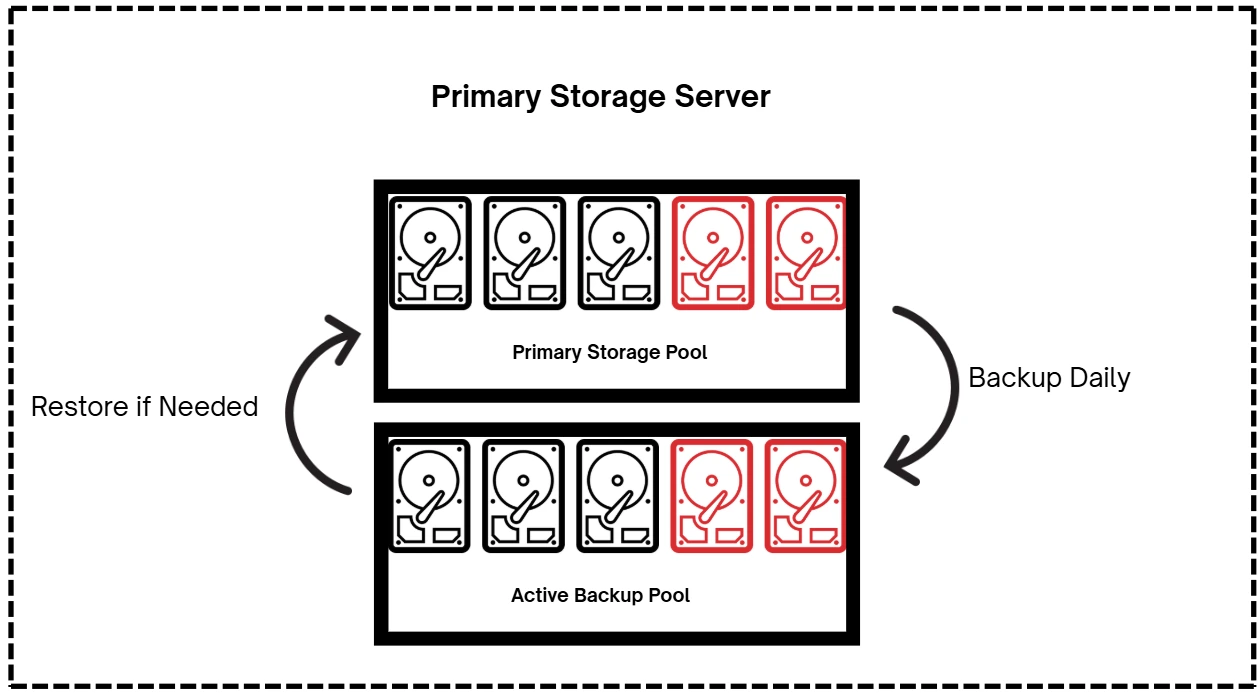
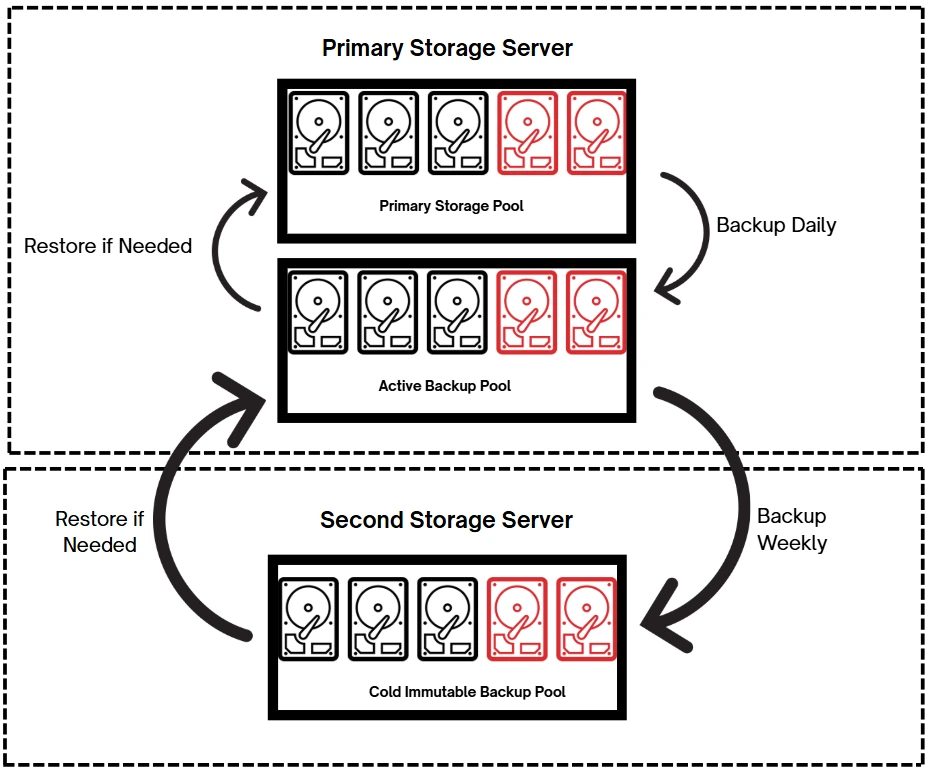
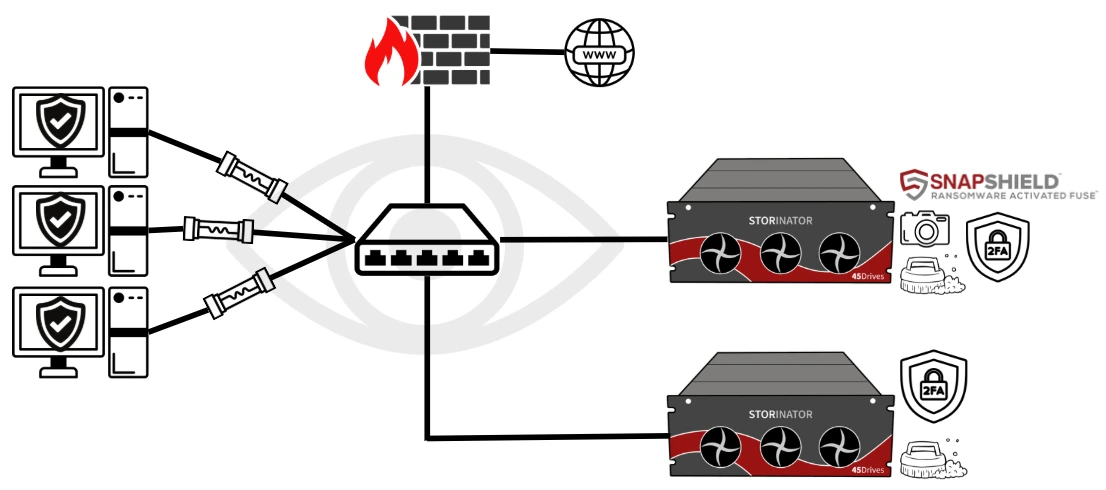
Although ZFS checksumming is extremely reliable, it is not completely foolproof. To further protect against data corruption, it's best practice to maintain regular local backup storage pools that can be quickly restored. Ideally, implement two local backup pools for added security: an active backup and a cold, immutable backup.
Local Active Backup
An active backup is a separate storage pool on the same server as your primary storage pool, which the organization uses for reading and writing data. Your primary data pool should be backed up to this pool regularly, at least every day.
In case of a restore, recovery is very fast since data transfers occur locally within the server, avoiding network delays.
Local Cold Immutable Backup
A cold immutable backup is data that is not intended to be read or modified and cannot be changed or deleted once written. This makes it a trusted, last-line local defense against data loss.
Ideally, it should be stored on a separate server, but if budget is a concern, a third storage pool on the primary server can be used. It is best practice to back up to this at least weekly.
Enable & Monitor Alerts
Knowing when failed checksumming occurs enables for swift action to recover data from backups.
Houston User Interface from 45Drives includes built-in system monitoring and lets you enable alerts when hard drive issues or other hardware anomalies are detected. You can choose to receive these alerts via email, phone, or other preferred channels.
Peril 3: Data Deletion - Accidental or Intentional
Whether it is a user who accidentally deleted an important spreadsheet, or a rogue employee looking to sabotage an organization's performance, as long as humans use data, deletion will occur.
Best Practices to Defend Against this Peril:
- Use a modern Copy-on-Write (COW) filesystem such as ZFS
- Enable & Schedule Snapshots
Copy-on-Write File System
When a file is changed, legacy filesystems will overwrite the block. This poses risks when a write is interrupted by events such as loss of power. If the write doesn't complete, data can be lost or corrupted.
In contrast, copy-on-write file systems like ZFS first copy the original block. Changes are made to the copy, and once the write is complete, its metadata is updated to point to the new block. If a write doesn't complete, the integrity of the original file is not impacted.
To learn more about ZFS Copy-on-Write check our video: ZFS Copy-on-Write Analogy
Snapshotting
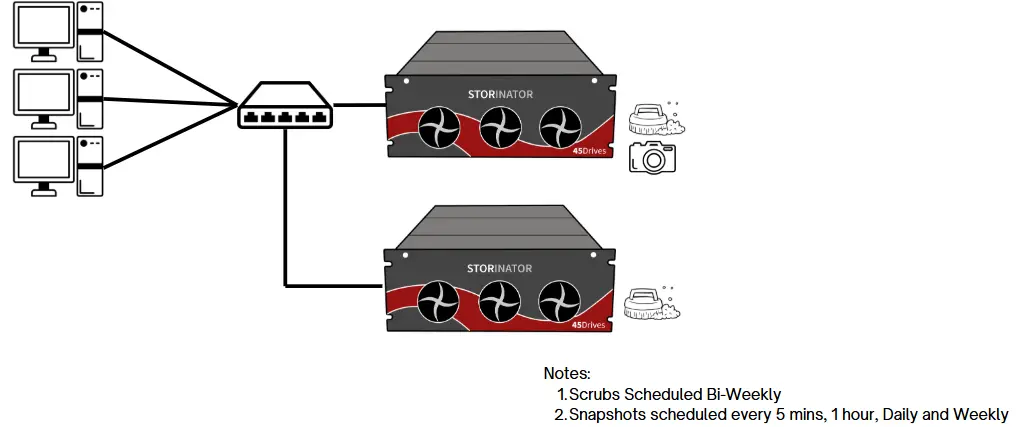
As ZFS uses Copy-on-Write, it enables the near instant creation of snapshots. A ZFS snapshot is a point in time copy of a dataset or volume that takes up nearly no storage space.
If a file is deleted or changes, you can restore the previous version of it from a snapshot.
It is best practice to schedule snapshots daily, weekly, and monthly. Although snapshots take up very little space, they accumulate over time. To reduce impact to overall storage capacity, it is recommended to delete older snapshots.
Snapshots can be scheduled and restored through Houston User Interface from 45Drives.
Learn More About ZFS Snapshots
Discover how ZFS snapshots can protect your organization from data deletion disasters.
Explore Houston UIPeril 4: Viruses & Ransomware
Viruses and ransomware are types of malware, malicious software intended to do harm. Ransomware is one of the most prevalent threats to data today. If a system becomes infected, hackers often encrypt your data and prohibit you from accessing it until a ransom is paid.
Best Practices to Defend Against this Peril:
Status Quo Cyber Security
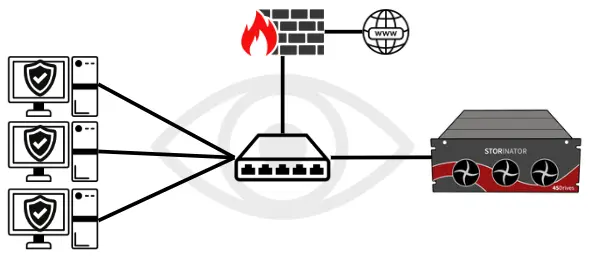
Compared to no protection, endpoint security, firewalls, and network monitoring greatly reduce ransomware risk. These tools are widely available and familiar to most administrators, and we strongly recommend implementing them.
However, despite having these measurements in place, attacks still happen. This occurs because the connection between the end points and centralized storage server remain fully open. When ransomware gets behind the status quo, chaos ensues and impact rapidly escalates.
SnapShield Ransomware Activated Fuse
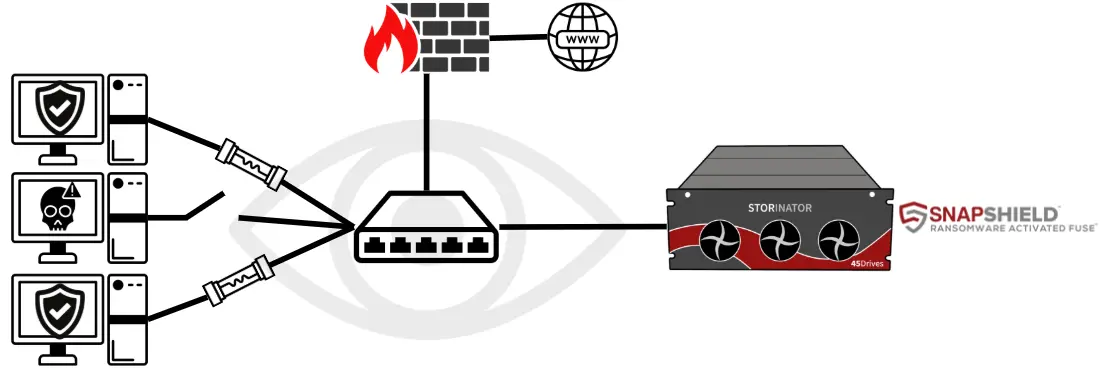
When ransomware gets behind the status quo security measures, 45Drives' SnapShield is the last line of defense. Utilizing real-time behavioral analysis, it functions as a "ransomware-activated fuse".
When it detects ransomware behaviour, SnapShield will sever the connection between the infected client and the storage server, like a fuse, while other clients continue to work as normal.
This proactive defense helps contain ransomware threats, preventing their spread and reducing downtime.
What Makes SnapShield Unique?
Behavioral Analysis
Monitors the behavior of data being written from client to server, analyzing file access patterns in real-time to detect suspicious activity.
Agentless Protection
Server-side protection requiring no software on individual workstations. All detection and response happen at the storage server level.
Targeted Isolation
Instead of shutting down the whole system, SnapShield disconnects only the infected workstation, allowing everyone else to keep working.
See SnapShield in Action
Book a live demo to see SnapShield defend against ransomware in a secure quarantined environment.
Peril 5: Exposed Root & Malicious Unauthorized Access
Think of a storage server as your house that holds all of your valuable belongings. Having an open door to your home with no lock (or an easy lock to pick) would put all your assets at risk of being stolen or damaged. A storage server is the same thing. Having wide open access to your storage server puts your data at risk.
Best Practices to Defend Against this Peril:
- Harden Root Access
- Remove Unnecessary Applications
- Set Permissions
- Two-Factor Authentication (2FA)
- Firewall Implementation
Harden Root Access
Root Users for Linux system is the administrator of the server. They are the superuser, and have unrestricted access to commands, files, hardware, etc. Essentially, they have the 'master key' to the storage server. There are some main ways this can be achieved:
Limit Root Access
Carefully evaluate who within the organization needs to be a root user of the server. Fewer superusers reduces the risk of insider threats or mistakes to occur.
Individual & Named Accounts
If the same root name and password is used by all superusers, you cannot tell who did what. With individual access, all commands are logged under a specific user, making it easy to audit and root cause issues.
Automatic Timeout
Setting a timeout automatically logs out an account after a period of inactivity, such as 5 minutes. This helps reduce the risk of unauthorized access if a superuser leaves their terminal unattended.
Remove Unnecessary Applications
Not all applications are critical to the operation of an organization. Some may be installed for testing, or could be an older now obsolete software. It could be as simple as a game being played on a desktop.
The more applications that are running, the more attack vectors are available. As well, it reduces the overall logs created, removing any "noise" in detecting odd activity.
Set Permissions
Organizations have employees with varying roles and responsibilities, and not everyone needs access to all folders and files on a centralized storage server. For example, a folder containing sensitive HR information should only be accessible to the HR department and relevant managers.
Evaluate each employee's role in collaboration with department managers to determine appropriate access levels. Set permissions according to the standards and policies defined by your organization.
Enable 2-Factor Authentication
Two factor authentication provides an additional layer of protection on top of a password. In the event a password becomes compromised, It can greatly reduce the risk of unauthorized access to secure accounts like the root access of a server.
Popular examples of 2FA are text/email codes and authentication apps.
Firewall Implementation
A properly implemented firewall blocks unauthorized access while allowing approved and intended traffic through. Below are high-level firewall configurations that help protect a storage server from unauthorized access:
- Close all unnecessary ports to minimize attack surfaces
- Change the default SSH port to reduce automated attacks
- Monitor networking logs regularly for suspicious activity
- If SSH must be exposed to the internet, disable password authentication and use key-based login only
Peril 6: Meteors (Natural/Man-made Disasters)
This serves as a metaphor for natural or man-made disasters. Events such as hurricanes, floods, and fires pose significant risks to both your physical infrastructure and the data stored within it.
Best Practices to Defend Against this Peril:
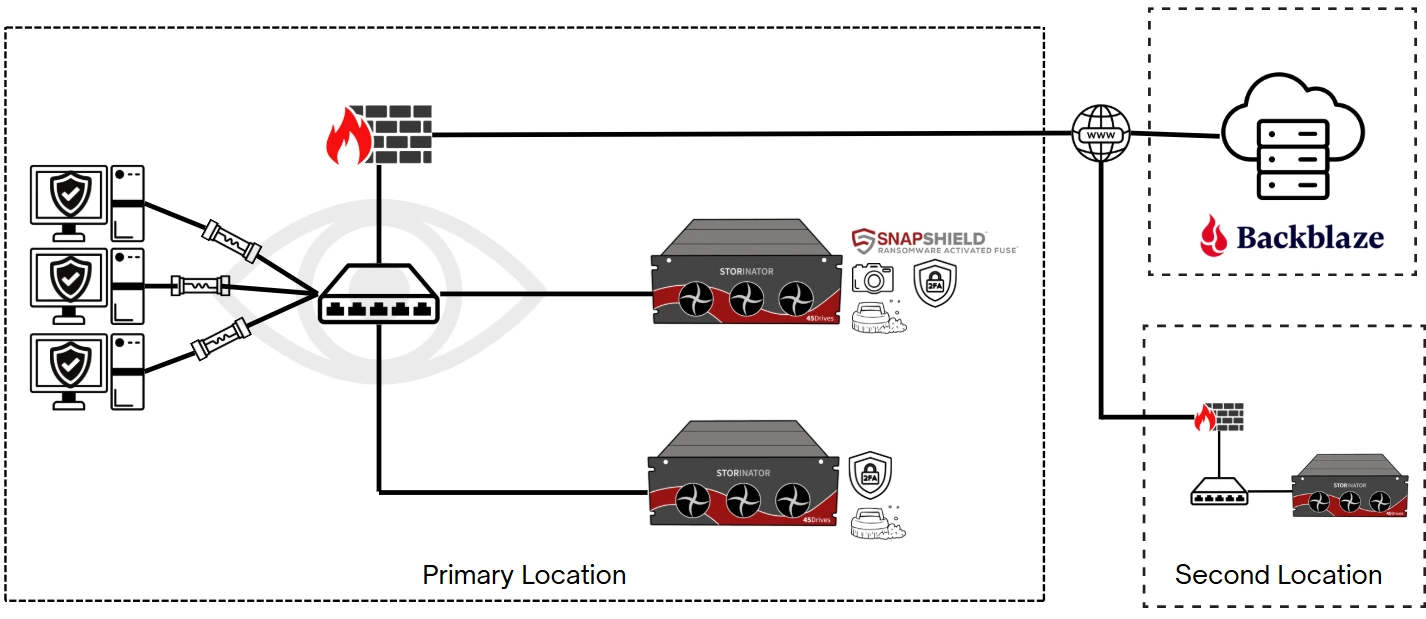
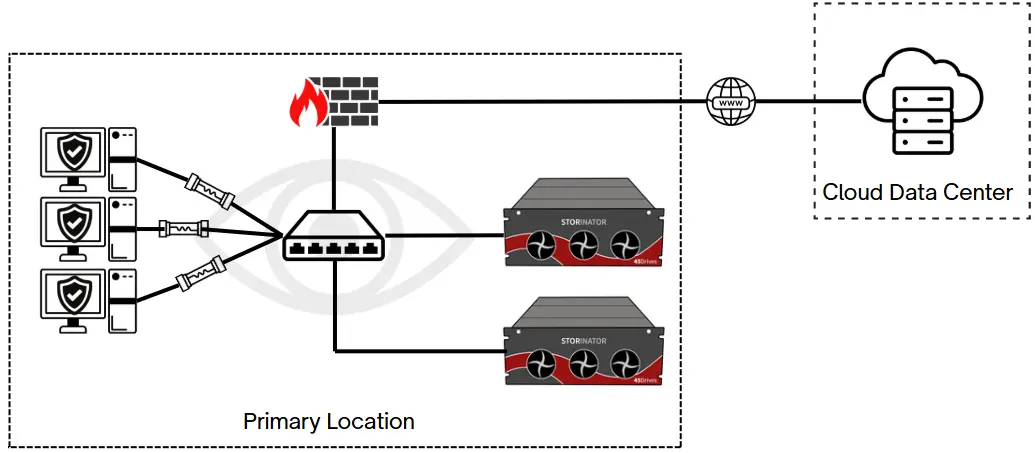
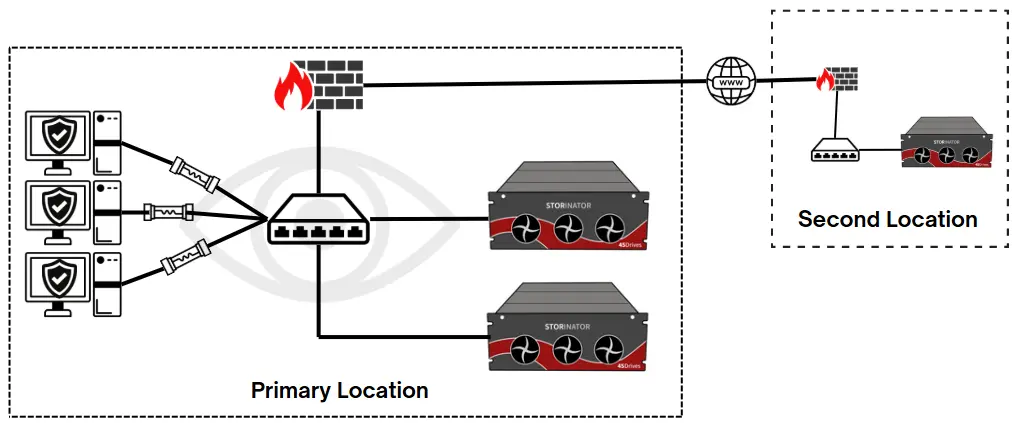
Minimum weekly backup strategies to a separate geographical location:
- Backup to the cloud
- Backup to a private off-site location (e.g., an office in a different city)
- Hybrid approach: cloud and private off-site location
Backup to Cloud
Cloud storage is a service that stores your data on servers located in data centers. Your files are stored on servers that can be accessed from the internet. For smaller data sets, cloud storage offers several key benefits, but also disadvantages that should be carefully evaluated.
Benefits of Cloud:
- No upfront capital purchase. Payment is typically monthly subscription model.
- Relatively easy startup. Get an account with a provider and connect your clients/servers
- Basically Infinite scalability
Disadvantages of Cloud:
- The cost per TB of data being stored is relatively high
- Performance is limited by internet speed, which can result in large latency when restoring backup data
- As data grows, so does your monthly bill, with additional charges often applied for accessing or downloading stored data
- Your data is held on another company's server and accessed over the internet, which some may view as a privacy risk
Backup to Private Off-Site Location
If you are an organization who has multiple office locations, you can take advantage of these buildings by having backups stored on your premises. Although this does require an additional upfront cost, there are key benefits:
Benefits of Private Off-site Backups:
- Lower total cost of ownership - After the initial purchase, ongoing costs are minimal (e.g., electricity), resulting in significant long-term savings compared to cloud storage
- Fast recovery times - Data can be restored by physically shipping the backup server or hard drives, which is much faster than recovering over the internet
- Privacy - Your storage remains behind your firewall, giving you full control over its security
Hybrid Approach
With the rise of affordable cloud providers like Backblaze, a hybrid approach can offer increased redundancy and enhanced security for backup data.
Making the Right Choice
To determine whether cloud storage is the right fit for your organization, carefully evaluate the total cost of ownership, your privacy requirements, and the speed at which you would need to restore backups in the event of an emergency.
Total Cost
Evaluate long-term costs vs. upfront investment
Privacy Requirements
Consider data sensitivity and compliance needs
Recovery Speed
Assess how quickly you need data restored
Prepare for the Unexpected
Don’t let disasters destroy your data. Contact us today to help plan a robust backup strategy
Talk to an ExpertPeril 7: Staff Changeover
IT employees who leave the organization or transition to new roles can pose both security risks and create knowledge gaps. Critical tribal or "craft" knowledge that isn't documented or shared among the team is at risk of being lost.
Best Practices to Defend Against This Peril:
- Document IT process & procedures
- Off-boarding checklist
Document IT Process & Procedures
By documenting what tasks are done and how they are performed, individual expertise is transformed into shared written procedures. This promotes consistency, streamlines onboarding, and ensures smooth day-to-day operations. Most importantly, it significantly reduces the risk of losing critical operational or security knowledge.
Best practices for documenting processes and procedures include:
- Using a centralized documentation platform
- Defining roles and responsibilities for creating and maintaining documentation
- Following standard writing formats
- Incorporating visual aids such as flowcharts
- Implementing version control to distinguish current and outdated documentation
- Ensuring documentation is searchable and easily accessible
Offboarding Checklists
If an employee leaves the organization with access to sensitive information such as login credentials, it poses a significant risk to company data and systems. The possibility of a former employee being able to modify or access resources should be prevented.
Creating a clear process with a simple checklist helps guide team members through the necessary steps when someone leaves the organization. This can greatly reduce the risk of unauthorized access or data compromise.
Employee Off-boarding Checklist
Having a standardized checklist ensures consistent security practices when employees transition out of the organization, protecting critical systems and data from unauthorized access.
Peril 8: Panic, Complacency, Assumptions
When mistakes or disasters occur, swift action is often necessary. In high-stress situations, poor communication and uncoordinated responses can quickly increase the risk to your data.
Best Practices to Defend Against this Peril:
To effectively reduce the emotion of panic during a disaster, remove complacency and assumptions, there are best practices to defend:
- Plan, train, audit
- Routine "fire drills"
- Routine "what if" roundtable discussions
Plan, Train, Audit
If you fail to plan, you plan to fail. Having plans and procedures written out on how to react to mistakes or disasters can significantly reduce latency in action and improve decision making. However, a written plan is not enough.
Team members should be trained regularly on the plan so they know where to find it, and how to follow it. Audits should be in place to ensure the plan is still relevant and up to date, as well as the team's retention of their training.
Plan
Develop comprehensive procedures for various disaster scenarios and response protocols.
Train
Regular training ensures team members know how to execute plans effectively.
Audit
Regular reviews ensure plans remain current and teams retain their knowledge.
Routine Fire Drills
Going through the motions in the event of a disaster is key. It can help evaluate if recovery plans are sufficient, and your team's ability to execute the plan. Fire drills for specific events should be scheduled, and evaluated.
This can include what to do when files are deleted, ransomware attack occurs, or a disaster that destroys a storage server.
Practice Makes Perfect
Regular practice drills help identify gaps in procedures and build muscle memory for crisis response, reducing panic and improving execution under pressure.
"What If" Roundtable Discussions
Bringing a team together to discuss hypothetical scenarios that could put data at risk can help uncover blind spots and strengthen response plans.
The goal is to ask "What if this happens.... how would we respond?"
Proactive Problem-Solving
These discussions help teams think through potential scenarios before they happen, identifying weaknesses in current procedures and developing contingency plans.
By exploring "what if" scenarios in a low-pressure environment, teams are better prepared to handle real emergencies with confidence and coordination.
Conclusion
Through our years in the enterprise space, we have learned the most common causes of data loss and developed proven best practices to defend against them. If you are looking to strengthen your existing infrastructure or build a new one with these strategies in mind, our team of experts are here to help. From initial architecture to configuration and ongoing support, we will work with you every step of the way to ensure your data remains secure, resilient, and accessible.
Contact Us Now